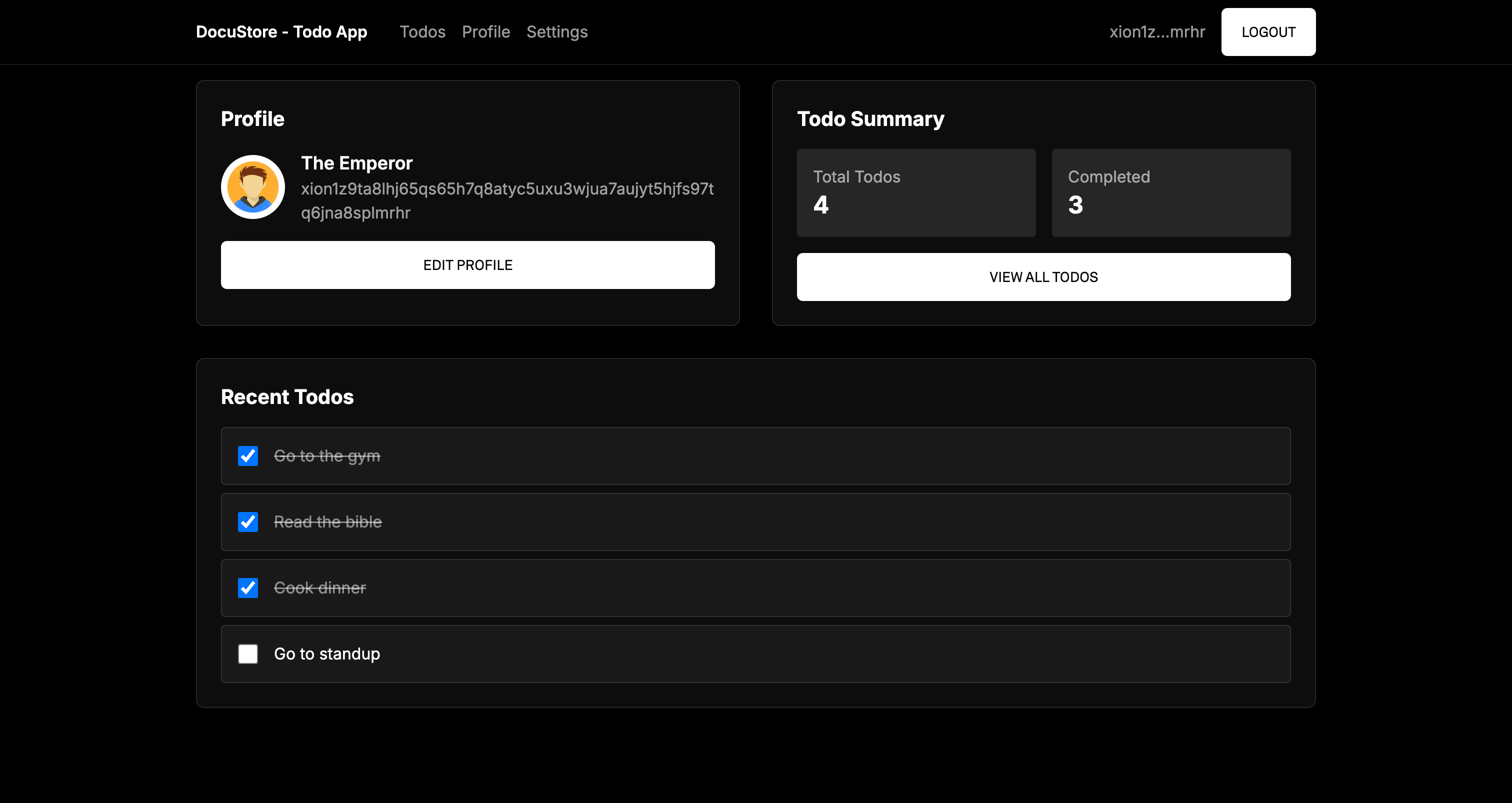
# Build a TODO App using the Collection-Document Storage Smart Contract
To reduce the need for custom contract development and accelerate Web2 to Web3 migrations, we've created a contract that provides a **collection/document based storage model**, inspired by Firebase’s Firestore. It supports structured JSON data storage using a flexible key-value format and an advanced permission model.
This solution is a major upgrade from the original `user_map` contract by enabling:
* **Namespaced storage**: Data is organized into logical **collections** and **documents**.
* **Permissioned access**: Fine-grained control over who can **`create`**, **`update`**, `delete`, and `read` documents.
* **Role-based security**: Support for roles like "creator", "admin", and any custom roles.
* **Batch operations**: Write multiple documents in a single transaction.
## Todo App Data Structure
This todo app interacts with the DocuStore smart contract by organizing data into three main collections. Each collection stores structured documents with user-specific data.
### Todos Collection
```javascript
interface Todo {
id: string;
text: string;
completed: boolean;
createdAt: number;
}
```
Each document in the `todos` collection represents an individual task. It includes basic task details, and timestamps.
### Profiles Collection
```javascript
interface Profile {
displayName: string;
bio: string;
avatar: string;
socialLinks: {
twitter?: string;
github?: string;
website?: string;
};
}
```
The `profile` collection stores public facing user profile data such as name, bio, and social media links.
### Settings Collection
```javascript
interface Settings {
darkMode: boolean;
notifications: boolean;
language: string;
timezone: string;
}
```
The `settings` collection holds user preferences for customizing the application experience, including UI theme, notification toggles, and localization options.
## Building the Frontend
We've created a frontend which is a [Next.js](https://nextjs.org/) application built to interact with the **DocuStore** smart contract that can be downloaded at . It showcases how users can connect their wallets, create todo records, update their profile, app settings and query their data.
### Manual Installation
1. You will first need to clone the repository:
```bash
git clone https://github.com/burnt-labs/todo-app-frontend
```
2. Install dependencies:
```bash
cd todo-app-frontend
npm install
```
3. Copy the **`.env.example`** file and name it **`.env.local`** and set the values with the information below:
```javascript
NEXT_PUBLIC_CONTRACT_ADDRESS="xion1svpts9q2ml4ahgc4tuu95w8cqzv988s6mf5mupt5kt56gvdnklks9hzar4"
NEXT_PUBLIC_TREASURY_ADDRESS="xion1aza0jdzfc7g0u64k8qcvcxfppll0cjeer56k38vpshe3p26q5kzswpywp9"
NEXT_PUBLIC_RPC_URL="https://rpc.xion-testnet-2.burnt.com:443"
NEXT_PUBLIC_REST_URL="https://api.xion-testnet-2.burnt.com"
```
| Variable | Description |
| ------------------------------- | ----------------------------------------------------------------------------------------------------------------------------------------------------------------------- |
| NEXT\_PUBLIC\_TREASURY\_ADDRESS | Treasury contract instance used for gasless transactions and grantz authorization to execute transactions via the DocuStore smart contract instance on behalf of users. |
| NEXT\_PUBLIC\_CONTRACT\_ADDRESS | Address of the DocuStore smart contract instance. |
| NEXT\_PUBLIC\_RPC\_URL | RPC endpoint for Xion (default: `https://rpc.xion-testnet-2.burnt.com:443`) |
| NEXT\_PUBLIC\_REST\_URL | REST endpoint for Xion (default: `https://api.xion-testnet-2.burnt.com`) |
3. Build and start the application:
```
npm run dev
```
You can now access the app at [http://localhost:3000](http://localhost:3000/) in your browser.
---
# Agent Instructions: Querying This Documentation
If you need additional information that is not directly available in this page, you can query the documentation dynamically by asking a question.
Perform an HTTP GET request on the current page URL with the `ask` query parameter:
```
GET https://docs.burnt.com/xion/developers/computation/xion-quick-start/zero-to-dapp-in-5-minutes/build-a-todo-app-using-the-collection-document-storage-smart-contract.md?ask=
```
The question should be specific, self-contained, and written in natural language.
The response will contain a direct answer to the question and relevant excerpts and sources from the documentation.
Use this mechanism when the answer is not explicitly present in the current page, you need clarification or additional context, or you want to retrieve related documentation sections.